Reader Note: This blog was initially written before Google Cloud evolved its Vertex AI platform into Gemini Enterprise Agent Platform. As such, some screenshots may reflect the former nomenclature.
Introduction
Integrating the Nutanix Cloud Clusters (NC2) solution on Google Cloud with Gemini Enterprise Agent Platform (formerly Vertex AI) enables organizations to leverage powerful tools and generative AI models, such as Google’s Gemini models, while helping to ensure data remains within a private network.
There are several ways to facilitate this connection, ranging from public internet endpoints to more secure internal routes using Private Google Access (PGA) to what we’re showing here: Private Service Connect (PSC).
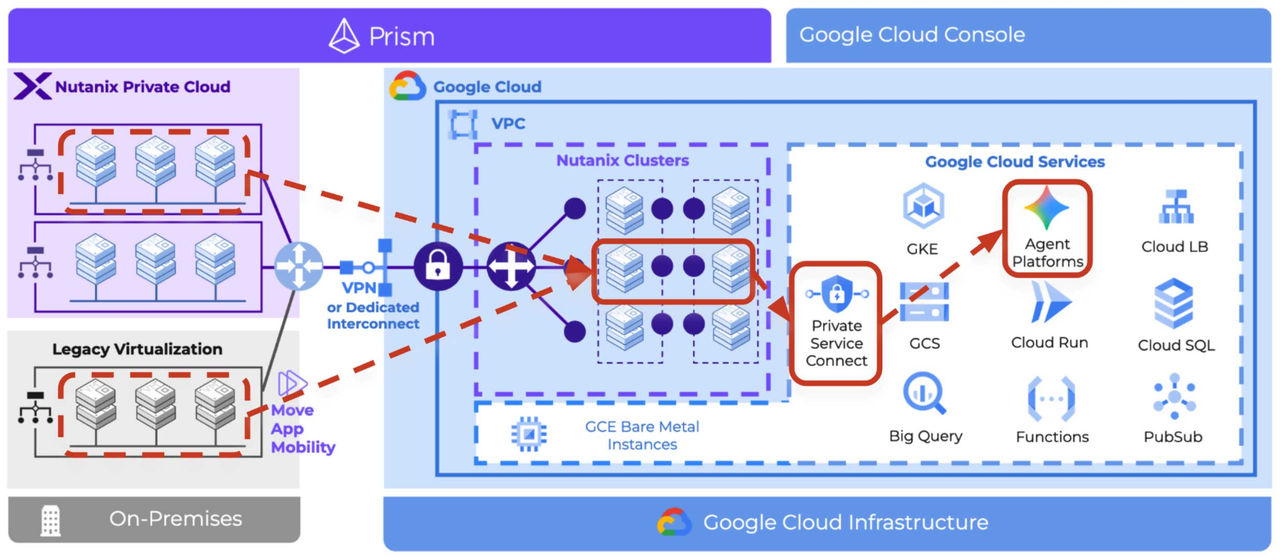 Fig 01. Integrating Nutanix Cloud Clusters (NC2) with Gemini Enterprise Agent Platform, from public internet endpoints to more secure internal routes using Private Google Access (PGA) to Private Service Connect (PSC)
The premise of this solution example is that you’ve used NC2, likely with the Nutanix Move migration tool, to quickly migrate a legacy virtualisation-based application to Google Cloud without re-architecting or refactoring. With the migration complete, you now wish to securely connect your applications to process data using the Agent Platform.
Environment Overview
The foundation of this architecture is an NC2 cluster on bare-metal nodes within a Google Cloud Virtual Private Cloud (VPC). This setup utilizes a "bring your own networking" approach where the VPC subnets, such as the cluster management and NAT subnets, are pre-configured—often using tools like Terraform—rather than selecting auto-created networks in the NC2 Portal.
Key Components:
- Networking: A Google Cloud VPC containing subnets for management, NAT, and specific user workloads.
- NC2 Cluster: Nutanix Cloud Infrastructure (NCI) 7.3 running on bare metal hosts on Google Cloud.
- Overlay Virtual Networking: All NC2 on Google Cloud deployments use the Nutanix Flow Virtual Networking (FVN) solution. In this example, the application server NIC is within an FVN “NoNATVPC”. This is an overlay network on the NC2 cluster that is routable from Google Cloud subnets. It also could have been on a NAT VPC subnet with a floating IP.
- Jump Box: An administrative Google Cloud instance used to securely access and manage the environment. But access could be via VPN or Cloud Interconnect.
Establishing Private Connectivity
To help ensure that traffic destined for Google AI services never traverses the public internet, we’ll establish a private endpoint. This process involves three main steps:
- IP Allocation: Allocate a global internal IP address (e.g., 172.26.0.100) to serve as the local gateway for Google APIs such as Private Service Connect.
- Forwarding Rules: Create a forwarding rule that directs all traffic sent to this internal IP directly to the Google APIs VPC.
- Security Configuration: Establish firewall rules that allow traffic to flow from your NC2 workload subnets (e.g., 172.40.0.0) to the newly created private endpoint.
Note that whilst you can establish a regional endpoint in an existing subnet, it can’t be used with the Gemini Enterprise Agent Platform. We are therefore using a global endpoint in a new subnet (172.26.0.100).
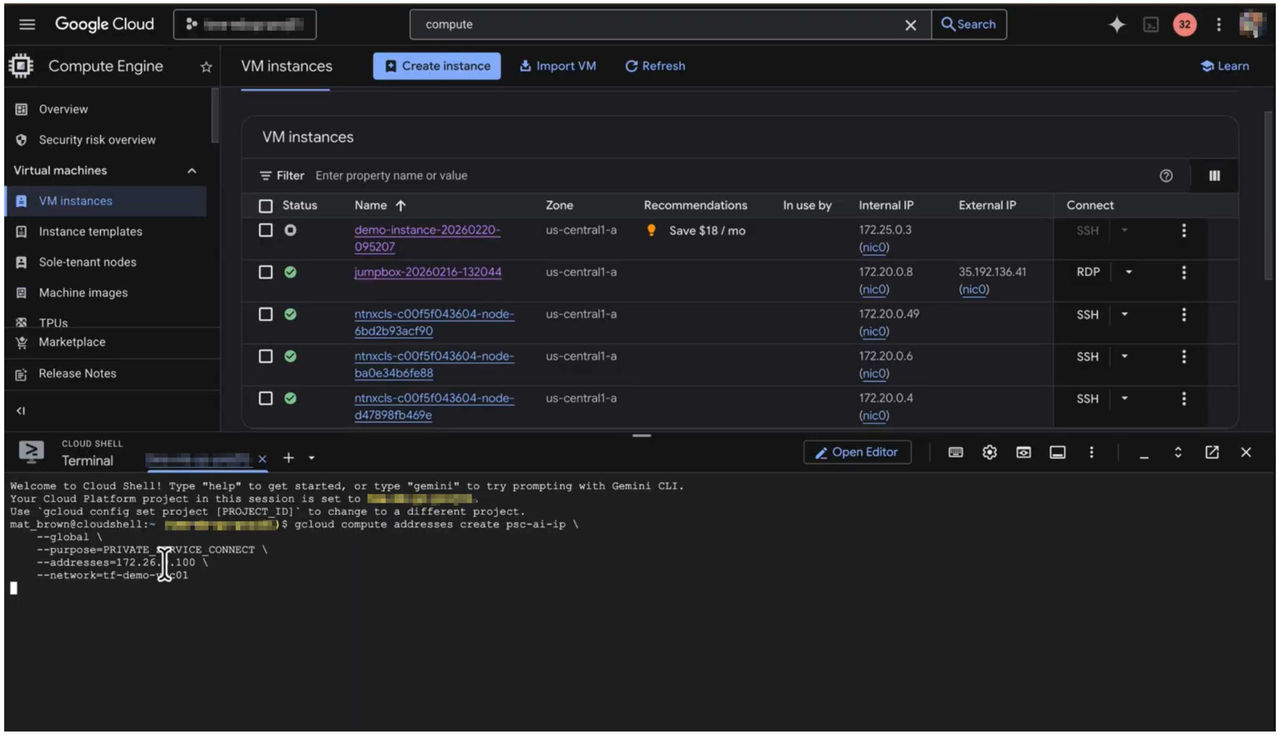 Fig 02. (TimeStamp 1:00): Creating the internal forwarding rule and IP in the Google Cloud console using Cloud Shell
Verifying Internal Routing
Before running AI workloads, it is critical to verify the route. By default, a ping to aip-platform.googleapis.com resolves to a public internet IP address (such as 209.x.x.x ). Once the private endpoint is correctly configured, the same request will resolve to your internal IP (e.g., 172.26.0.100), confirming that the traffic remains within the VPC.
The “Production Grade” way of doing this is with a forwarding rule in your Google Cloud VPC. The “It's just a demo” approach is to add a host file entry on the application server. Do what works for you.
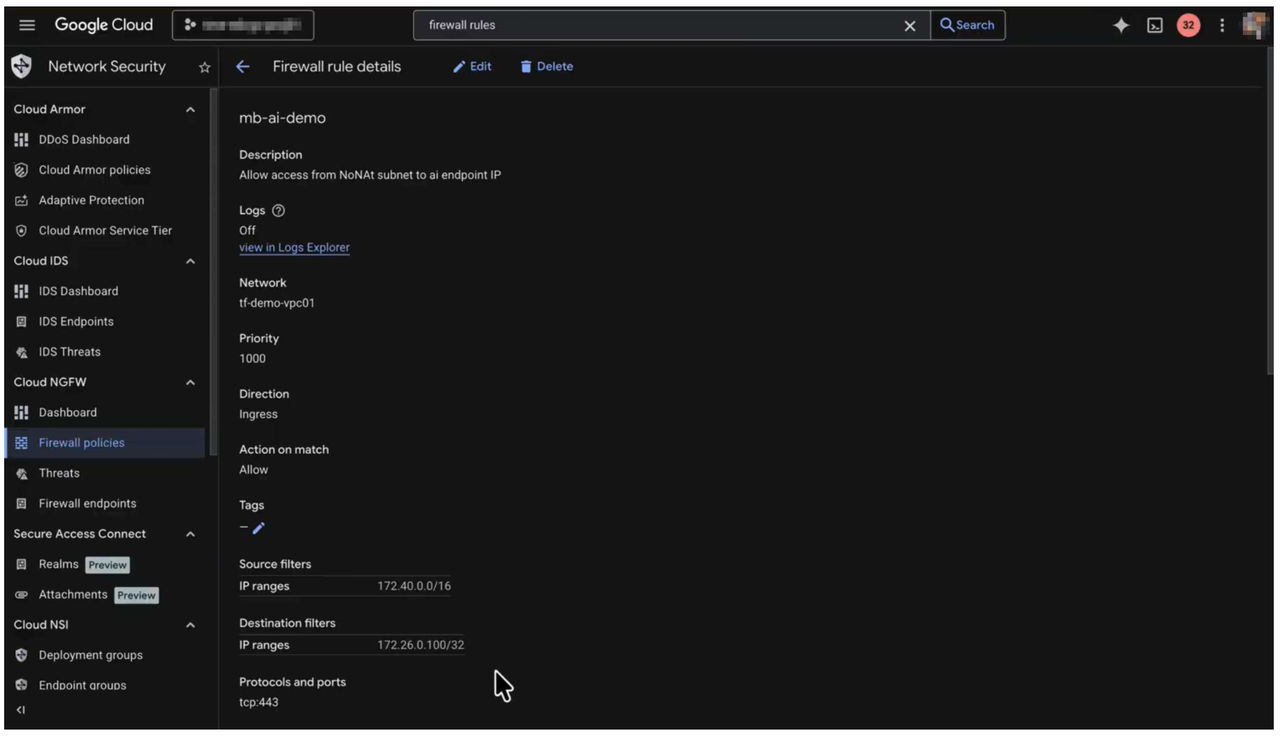 Fig 03. (Timestamp: 02:34 - Successful internal resolution of the API endpoint)
The Test Application: Image Analysis with Gemini
To demonstrate the integration, a Python-based test application is deployed on the Application server VM within the NC2 cluster. This application is designed to analyze images using Gemini models.
How the Application Works:
- Configuration: The app uses a config.json file to define the target Google Cloud project, geographic location, and specific AI model to be used, and other inputs below.
- Data: The application pulls a test image—in this case, a photo of the front of a house.
- Credentials: A Service account has been created with the relevant roles assigned for using Gemini Enterprise Agent Platform. An access key and secret is then created and saved as a .JSON file from the Google Cloud console.
- The Prompt: The app sends the image along with a text prompt to Gemini Enterprise Agent Platform, asking it to analyze the contents.
- AI Analysis: The Gemini-enabled service processes the request and returns a JSON response. In the demo, the AI correctly identifies that the house in the image has a "black door" and displays the house "number 28".
It is pretty simple, but it's just there to demonstrate that secure access is possible, and data can be returned programmatically for further action. Probably the most important aspect is the prompt, which is written in natural language and defines the output format and the analysis required. If you need help writing a prompt, Gemini can help.
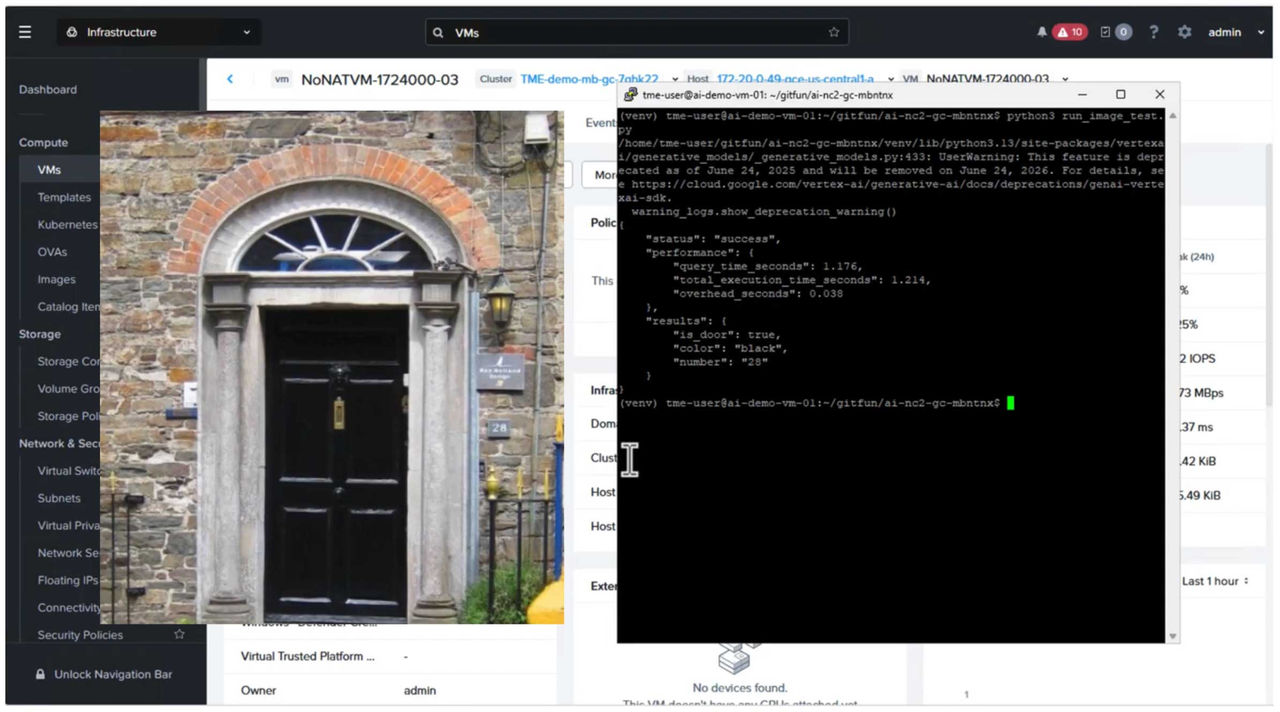 Fig 04. (Timestamp: 03:09) - Reviewing the Source image and AI analysis output
Monitoring and Logging
Visibility is maintained through the Google Cloud Logs Explorer. Every time the application runs, a "content generation" hit is recorded. Administrators can query these logs to see detailed metadata, including the specific model used, the project ID, and the exact timestamp and location of the execution.
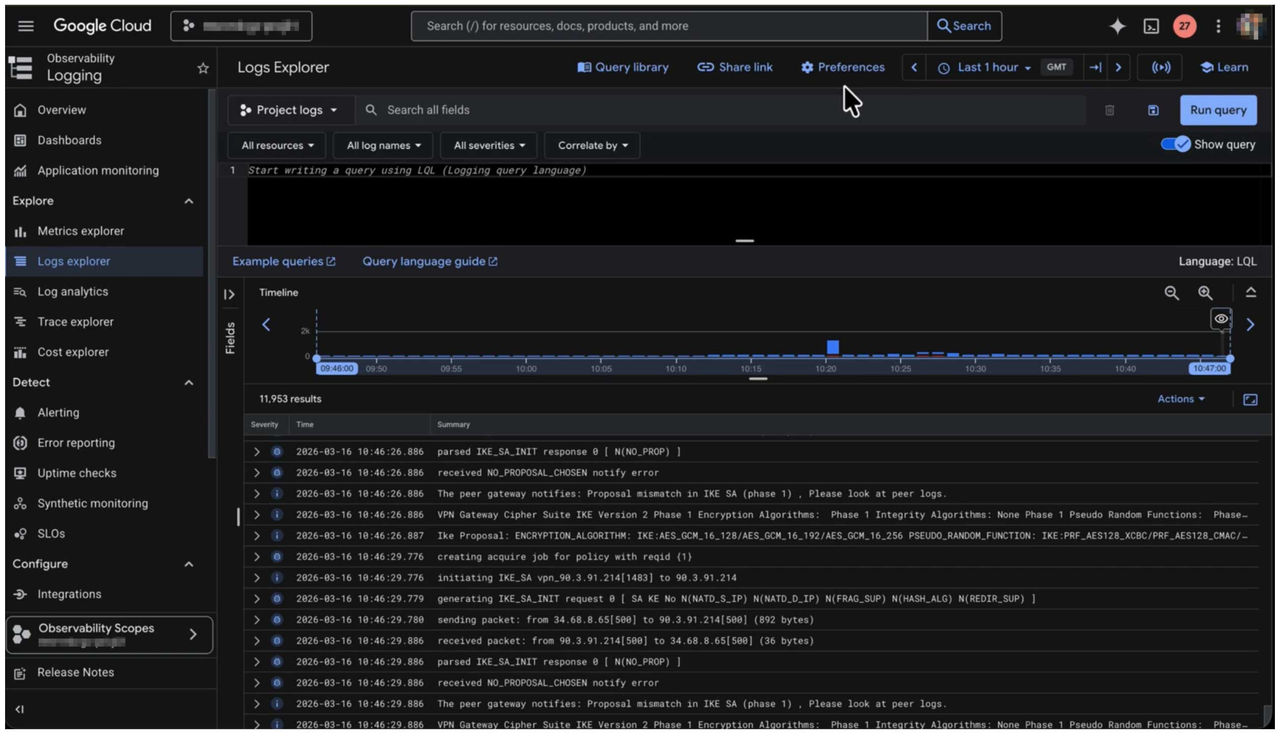 Fig 05. (Timestamp: 04:31 - Viewing Gemini Enterprise Agent Platform hits in Logs Explorer)
Conclusion
By connecting NC2 workloads to Gemini Enterprise Agent Platform via private endpoints, organizations can leverage world-class machine learning capabilities without sacrificing the security of their private network.
By migrating applications to NC2 on Google Cloud, these services can be accessed with low “in-cloud” latency and high bandwidth. Furthermore, by utilizing Flow Virtual Networking, the application could be migrated to a NAT subnet that maintains its on-prem IP space.
This architecture ensures that sensitive data, such as images processed for analysis, never leaves the VPC (except for a few seconds whilst being processed within the Gemini Enterprise Agent Platform while providing a seamless bridge between Nutanix infrastructure and Google Cloud's advanced AI ecosystem.
For more information on NC2’s collaboration with Google Cloud, please visit the product page.
Or why not take a free Test Drive?
©2025 Nutanix, Inc. All rights reserved. Nutanix, the Nutanix logo and all Nutanix product and service names mentioned are registered trademarks or trademarks of Nutanix, Inc. in the United States and other countries. All other brand names mentioned are for identification purposes only and may be the trademarks of their respective holder(s). This content reflects an experiment in a test environment. Results, benefits, savings, or other outcomes described depend on a variety of factors including use case, individual requirements, and operating environments, and this publication should not be construed as a promise or obligation to deliver specific outcomes. Code samples, snippets and methods that appear in this content are unofficial, are unsupported, and are provided AS IS. Nutanix makes no representations or warranties of any kind, express or implied, as to the operation or content of the methods. Nutanix expressly disclaims all other guarantees, warranties, conditions and representations of any kind, either express or implied, and whether arising under any statute, law, commercial use or otherwise, including implied warranties of merchantability, fitness for a particular purpose, title and non-infringement therein.